Remove Source Safe Bingings from Projet and solution
There is two ways to remove the source safe binding.
- Use Visual Studio to remove the binding
- Manual remove.
Use Visual Studio
- Start visual studio without acces to the source safe server
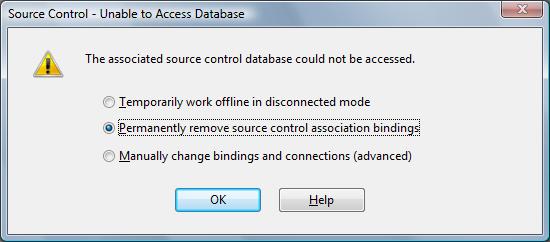
- Select the Permanently remoce source control association bindings
- Klik ok.
Manual remove
1 – Go to the folder containing the solution files and delete the following:
mssccprj.scc
MyProject.vssscc
vssver.scc
2 – Open MyProject.sln in your favorite text editor and remove the following section:
GlobalSection(SourceCodeControl) = preSolution
…
EndGlobalSection
3 – Go to the folder containing the project files and delete the following:
MyProject.vbproj.vspscc
mssccprj.scc
vssver.scc
4 – Open MyProject.vbproj in your text editor and remove the following lines:
SccProjectName = "SAK"
SccLocalPath = "SAK"
SccAuxPath = "SAK"
SccProvider = "SAK"
Now you can open the solution/project with no source control errors.
Leave a Reply