

Linksys WRT150N does not response to anything, no LAN response at all.
- Step 1
- Setup your PC with a static IP address 192.168.1.77 submask 255.255.255.1 and default gateway 192.168.1.1
- Connect a LAN wire to one of the LAN port and start a ping -t 192.168.1.1 and look for the response. Try all the reset options: http://www.dd-wrt.com/wiki/index.php/Reset_And_Reboot
- Step 2
- Now we know that de device does not work. You do not receive any IP packaged’s on your wire.
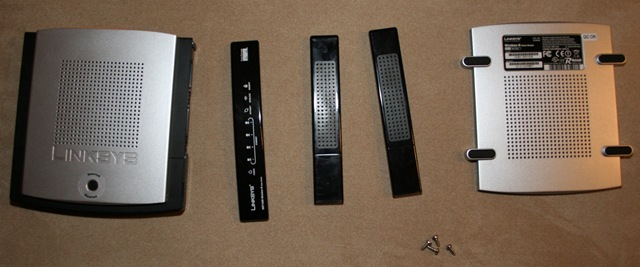
- Disassemble the box. There is 4 tox screws on the button under the redeemable plastic cover.


- Step 3
- Try short wiring two of the pins on the flash chip. Ping 16 & 17. http://voidmain.is-a-geek.net/redhat/wrt54g_revival.html
- Short circuit ping 16 & 17 – Chip VER: 1.00.5 CS:F898 – the one with the two red dots on. Power the device up when short circuiting and se if the ping gets a response.

- Step 4 Recovery by JTAG cable http://www.dd-wrt.com/wiki/index.php/Recover_from_a_Bad_Flash
- Step 3 did not work. We the has to create a JTAG. To program the circuit directly from the computer. 🙁
- Construction a JTAG: There is a simple and easy way to construct such a device. You need:
- A parallels connector
- 4 x 100 Ohm resistors
- Some wire not to long (15 cm)
- A Connector socket for the circuit board & connector for the wire ass well.
- Assemble the parts as shown below


- Now the wire is ready now the circuit board has to be prepped as well. There is two connectors for the JTAG on the board. JP1 & JP3. Here it is the JP1 you have to use.

- Download the tjtagv2.zip (769,27 kb). Connect the cable to the pc then the WRT150N JP1 and power up the WRT150N.
- Set up the tjagv2 as described in the zip. Then start a command prompt and fire the commands:
- tjagv2 /probeonly /noemw
- Now you should get something like:
- tjagv2 /probeonly /noemw
=================================================
WRT54G/GS EJTAG Debrick Utility v4.8-Tornado-MOD
=================================================
Probing bus … Done
Instruction Length set to 8
CPU Chip ID: 00010101001101010100000101111111 (1535417F)
*** Found a Broadcom BCM5354 KFBG Rev 1 CPU chip ***– EJTAG IMPCODE ……. : 00000000100000010000100100000100 (00810904)
– EJTAG Version ……. : 1 or 2.0
– EJTAG DMA Support … : YesIssuing Processor / Peripheral Reset … Done
Enabling Memory Writes … Skipped
Halting Processor … <Processor Entered Debug Mode!> … Done
Clearing Watchdog … DoneProbing Flash at (Flash Window: 0x1fc00000) … Done
Flash Vendor ID: 00000000000000000000000010001001 (00000089)
Flash Device ID: 00000000000000001000100011000011 (000088C3)
*** Found a Intel 28F160C3 1Mx16 BotB (2MB) Flash Chip ***– Flash Chip Window Start …. : 1fc00000
– Flash Chip Window Length … : 00200000
– Selected Area Start …….. : 00000000
– Selected Area Length ……. : 00000000*** REQUESTED OPERATION IS COMPLETE ***
- tjagv2 -rease:nvram
- it will show all the addresses it erases. Now the device should start responding to the pings, which was the case for me. 🙂 If you have accidentally delete the whole flash you need to put back a bootloader cfe.bin. I made a backup of mine here: CFE.BIN (256,00 kb) for WRT150N.





References:
- http://www.dd-wrt.com/wiki/index.php/Version_5_And_6_Router_Information
- http://www.dd-wrt.com/phpBB2/viewtopic.php?t=27572&sid=7d6af1568db656c9b24f8fe76e57957a
- http://www.dd-wrt.com/phpBB2/viewtopic.php?p=123707&sid=a501c708ab5c39d78dafee18eea6af3f
- http://www.dd-wrt.com/dd-wrtv2/down.php?path=downloads/others/tornado/jtag/
Leave a Reply