
Here is a link to a C# command line parser library: link

Command line interface for W-lan in Windows xp, vista, 7
Windows has a command line interface for the wireless profiles, here are a few commands which can be usefulle:
- netsh wlan show profiles (show all profiles)
- netsh wlan export profile name=”NetworknetForFree” folder=C:\
- If the profile name is left out all profiles are exported
- netsh wlan add profile filename=”c:\Wireless Network Connection-NetworknetForFree.xml” user=all
Read the hole post here
Maven and SourceForge
To get the most of Maven you properly want to use features like the site and deploy plug-ins. Here you can build modules of a project and upload them so other just can use them. With the site plug-in you can easily make documentation from your javadoc and the information from the Maven structure is automatically included as the core structure in the website.
SourceForge
Integration guides
Maven 2 general plug-ins links
Maven goals
- mvn site:stage -DstagingDirectory=C:\site
- mvn site-deploy
CPUZ – Get information about main hardware devices
CPU-Z is a freeware that gathers information on some of the main devices of your system.
CPU
- Name and number.
- Core stepping and process.
- Package.
- Core voltage.
- Internal and external clocks, clock multiplier.
- Supported instructions sets.
- Cache information.
Mainboard
- Vendor, model and revision.
- BIOS model and date.
- Chipset (northbridge and southbridge) and sensor.
- Graphic interface.
Memory
- Frequency and timings.
- Module(s) specification using SPD (Serial Presence Detect) : vendor, serial number, timings table.
System
- Windows and DirectX version.
Beagleboard uBoot
Load uBoot
Here is a u-boot which works for Ubuntu and Ångstrøm: u-boot-f.bin (176.52 kb) find more info at http://elinux.org/BeagleBoardUbuntu
Steps:
- mmcinit (or "mmc init")fatload mmc 0 0x80200000 u-boot-f.bin
- nand unlock
- nandecc sw (or nand ecc sw)
- nand erase 80000 160000nand write.i 0x80200000 80000 160000
- reset
Set boot cmd and args
Steps:
- setenv bootcmd ‘mmc init; fatload mmc 0:1 0x80300000 uImage; bootm 0x80300000’
- setenv bootargs ‘console=ttyS2,115200n8 root=/dev/mmcblk0p2 rw rootdelay=2’
- saveenv
- boot
Backup / restore SD cards on Linux (Ubuntu)
More info about dd
Backup
- sudo dd if=/dev/hdx | gzip > /path/to/image.gz
Restore
- gzip -dc /path/to/image.gz | sudo dd of=/dev/hdx
Windows Vista VPN connection no longer working after month of use without problems
Windows Vista has again shown a funny feature. It can turn of the components which makes VPN connections work without giving you any valid description other than VPN connection problems.
So if you have a VPN connection on your vista machine which suddenly stopped working and where you know the server still is working this might be a solution. It worked for me anyway:
- open a command prompt in administrator mode and continue to step 2 or run the batch file below
- uninstall miniports
- netcfg -u ms_l2tp
- netcfg -u ms_pptp
- install them again
- netcfg -l %windir%\inf\netrast.inf -c p -i ms_pptp
- netcfg -l %windir%\inf\netrast.inf -c p -i ms_l2tp
Change words manually added to T9 on Symbian
To change/add/delete words form a Symbian phone you need to get access to the file system. This can be done with the use of FExplorer (other file browsers). You need to manually sign the application to install it, this can be done online http://www.symbiansigned.com/ where you enter your phones IMEI number and upload the file. Then they will sign it and you will get a download link.

More info about the file system e.g. where the different settings on the phone are stored. Link
Wordbook location
The wordbook is located in
- C:\system\data\PTIT9UDB0F.DAT
- or
- c:\predic\101F8615_F.dat
Changing data in the file
To change the data in the file you need to use FExplorer to copy the file to c:\data\Documents and then fetch it from your pc. Then the file can be renamed from .dat to .txt an you can change in the file. To add or delete you need to change the length of the word which is stores like this on a Nokia E51:
00 08 00 6C 00 61 00 75 00 73 00 64 00 61 00 68 = length=8 and word=lausdahl separator between values=00
Additional to this a checksum needs to be changes somewhere in the file. Currently unknown to me. For this a hex editor is needed.
Tur til Tunisien – Djerba
Tur til det afrikanske kontinent. Tunisien (Map) dejligt sommervejr med både 30 grader i luften og 28 i havet jo næsten som at være i spa.

Her et billede af Hotellet. Og deres yderst moderne transport midler.


Ja og kamel tur kan man sørme også komme på. Av, 1,5 time på sådan et træsæde. Men så bliver det hele ellers også koordineret via mobil fra æslet aka. Donkey.


Ja og tro det eller lad være men det kan faktisk regne ret så meget selv om der kun er lidt under 3 timer i Jeep til Sahara.



Butikker i hovedbyen Houmt Souk
Ja og turist butikker er stort set det eneste der er på Djerba, det skal dog lige nævnes at de også har et fiskemarked med “fisk” ja det er ikke fisk som vi kender det for der er kun fisk – altså ingen tøris og temperaturen ligger normal minimum på 30 grader, så det er nok ikke en 🙂 de får for det.


Dessert trip
Med Jeep til Sahara aka “den store sandkasse” (9 mil kvadrat kilometer). Vi var lige et smut forbi en gammel Ksar som på den ene side bliver brugt til turister hvor bagsiden nok mere ligner det oprindelige bygningsværk.

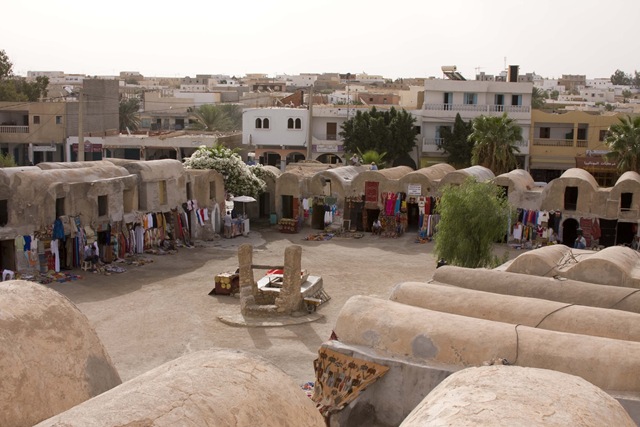

Underlig grim mand! Ja ham i den grønne bluse med siv hatten. Ikke de to andre der skulle ud og ride kamel i ørkenen.


Her er så mig og min kamel 🙂 Sikken en blød en og så med gyro ophæng 🙂
Ja vi kørte tydeligvis lige forbi en sammenpakket butik. Måske det lige skulle have været en af de der røde/hvide plastik strimler på for at indikere at… Han intet kunne se..
Ja og Liberisk smugler olie kunne man også købe i vejkanten. Tror ikke denne tankstation har lagt specielt dræn til oliespild. Ja og så er der lige det med afgift af køretøjer – dyrt, så dem køber de i Frankrig. Det var hvad karl smart her nedenfor havde gjort. Han kørte ikke ordentligt så vi var så heldige at få ekstra action på vej hjem fra ørkenen. Overhal ikke en traktor inde midt i en by før du er sikker på det der ikke holder en gammel knallert med gas flaske i cykelkurven der skal dreje til venstre. Ja ellers kommer den jo til at sidde fast i motor blokken på den fine nye kværn.


Hjemad igen
Ja det var så den tur. 🙁 så kunne man se frem til endnu en Kold tur hjem i JetTime flyveren. Er sikker på jeg så en pingvin på toilettet.


Eclipse spy and shortcuts
Eclipse Spy: Enables you to get information about what kind of e.g. window you are looking at in eclipse. This is useful if you be your self are developing plug-ins for eclipse. To invoke Eclipse spy:
- alt + shift + F1
An other blog post about Eclipse 3.4 Hidden Treasures can be found at http://eclipse.dzone.com/articles/eclipse-34-hidden-treasures
Eclipse shortcuts: (source)
- quick outline: ctrl + o
- open resource: ctrl + shift + r
- open type (class, interface etc.): ctrl + shift + t
- go to line: ctrl + l
Check PDF for Embeded fonts with pdffonts
pdffonts runs on many operating systems and is part of the free Xpdf distribution. If permitted by local software policies you should obtain the latest version ofpdffonts by downloading and installing the latest version of Xpdf. To get a listing of the font embedding for a particular PDF file you need to run the pdffonts utility. For example:
pdffonts myarticle.pdf