Visual File Comparison Tool

edscreen

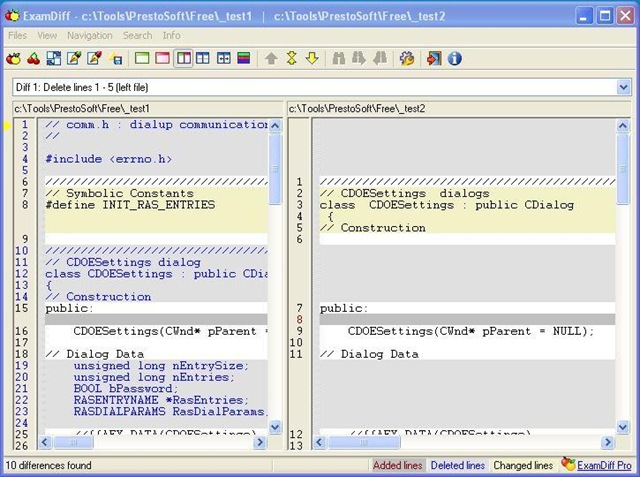
ExamDiff is a freeware Windows 95/98/Me/NT/2000/XP/2003/Vista tool for visual file comparison. It has a number of simple and convenient features that many users have been asking for a long time from a file comparison tool.

ExamDiff is a part of a suite of products that includes FtpVC, an FTP based Version Control System that allows joint software development remotely over the Internet.

Key Features

  • Automatically detects file changes.
  • One push re-compare function.
  • Drag and drop support.
  • Easy editing of the first and second files, by spawning an external editor of choice.
  • Saves the file differences in a standard UNIX DIFF file.
  • Easy navigation through the differences.
  • "Search" command.
  • Fully customizable.
  • Adjustable pane splitter with smooth synchronized scrolling.
  • Extensive command line interface.

Download link.

Anti-virus for Windows Vista

I can recommend Avas! anti-virus home. Its free and runs with a minimal amount of resources.

Link

NEXT no.5 in Århus 2008

Below are a lithe description of some of the most interesting tings I discovered there. Link to more projects:

Pleo

  Pleo

Pleo is a robot with personality it adapts to the person interacting with it during its life. Its is actually very fun and you cant help your self you simply have to play with I. You don’t see it as a robot but as a pet instead.

Here are a short discovery description from their web site:

Every Pleo is autonomous. Yes, each one begins life as a newly-hatched baby Camarasaurus, but that’s where predictability ends and individuality begins. Like any creature, Pleo feels hunger and fatigue – offset by powerful urges to explore and be nurtured. He’ll graze, nap and toddle about on his own -when he feels like it! Pleo dinosaur can change his mind and his mood, just as you do. Discover Pleo’s emotions.

Pleo has a price tag of:

Pleo web site: Pleoworld

A little quote I found under a discussion about Pleo:

I bought Pleo and I love it! However, don’t leave Pleo alone with little dogs. I walked into the room and found my dog humping Pleo. The strange thing is Pleo was making noises, as if he was enjoying it! The sensors in this thing are amazing! Buy it! You’ll love it and so will your dog! Source

Stickeybot

stickybo

Description from innovation lab:

Stickybot | Sangbae Kim, Mark Cutkosky and Barrett Heyneman

Stickybot is quadruped robot capable of climbing smooth surfaces, such as glass, acrylic and whiteboard using. The design is mostly inspired by morphologic study of the best climber, Gecko lizard.

Microsoft Photosynth

photosynth

Description from innovation lab:

Microsoft Photosynth | Microsoft

Photosynth is a technology, which has been developed by Microsoft Research, who, after having analysed a big collection of photos of objects and places, have collected and rendered them in a reconstructed 3-dimensional environment.

The technology can be used on photos of places, buildings or something else that people normally take pictures of (like The Notre Dame in Paris for example) found on the Internet. Photosynth is able to use those pictures to create amazing multi dimensional environments with zoom and navigation functions.

Blog post from Microsoft. Here

iBar | Mindstorm

iBar

Description from innovation lab:

iBar | Mindstorm

iBar is a system for the interactive design of any bar-counter. Integrated video-projectors can project any content on the milky bar-surface. The intelligent tracking system of iBar detects all objects touching the surface. This input is used to let the projected content interact dynamically with the movements on the counter. Objects can be illuminated at their position or virtual objects can be “touched” with the fingers.

Skiferie i Zell Am See med stor action pack

Vi bestilte en skiferie gennem Højmark til Zell am see i uge 10, 2008. Men det hele gik ikke lige som vi havde forestillet os.

Rejsen startede i Billund lufthavn hvor vi ventede på vores fly, men da vores fly havde afgang var gaten stadig ikke åben da flyet manglede. De viste sig senere at flyet var blevet forsinket pga slemt uvejr i zell am see. Et kraftigt uvejr havde forsaget et stenskred mellem Lofer og Zell am see hvilket havde dræbt en taxa chauffør.

Da vi endelig kom til zell am see havde vi perfekt vejr 15 grader og dejlig sol. Kanon… hvis det da ikke lige var fordi det var skiferie vi var taget på og hele skisportssteder var lukket, så ingen ski den dag. Det blev i stedet til en tur på skøjter.

Mandag kanon ski vejr på Kitzsteinhorn.

IMG_3009 IMG_3011

Tirsdag havde vi ligeledes en god stille dag på ski. Men dette var åbenbart ikke underholdning nok så inden vi skulle spise aftensmad blev der lige sat lidt fut i tingene.

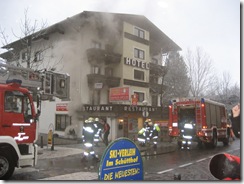
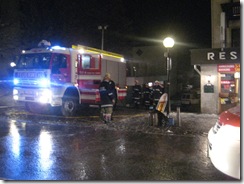
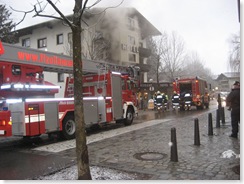
Ja der gik sku lige lidt ild i hotellet
 IMG_30771 IMG_30791
IMG_30831 IMG_3082
loadcluster FastResource
Ja brand alarmen var ikke lige noget at råbe hurra for, man kunne ikke høre den. Og det man kunne høre lød som en lastbil der bakkede (samme lyd som sne scooter og piste maskiner) hvilket ikke var så smart. Men alle kom ud og en 5 stykker måtte lige til kontrol på sygehuset for røgforgiftning.


IMG_3089 IMG_3091
IMG_3094 IMG_3096
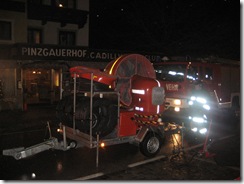
Nok det sejeste udstyr de østrigske brandmænd havde. Lidt vildt med en føntørre i den størrelse til at blase røgen ud fra hotellet. Link ti blæser in action

IMG_3098 IMG_3099
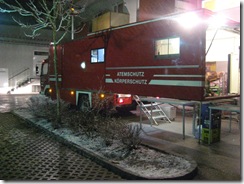
Udstyr til røgdykkerne.

IMG_3102

Her er nogle artikler omkring branden:

Vi må sige at Højmark var hurtige til at få styr på tingene. Der gik ikke lang tid før der var pizza til børnene og ca. 4 timer efter at der gik lid i hotellet fik vi en taxa til et nyt hotel og aftensmad der med 3 retter og det hele. Næste morgen var der ski til alle eftersom at alt fra det andet hotel jo ligesom var smeltet lidt:-)

Onsdag havde vi så lidt kælketur hvilket selvfølgelig også indeholdt lidt action – lidt trykkede ribben og en anelse blod ved hosten så der var lide en enkelt der fik et varmt ophold på sygehuset, men guiderne kendte vel efterhånden vejen ๐Ÿ™‚

Her er lige lidt link til noget seriøst snow tupe kørsel.

Link

Debrick Linksys WRT150N

Linksys WRT150N does not response to anything, no LAN response at all.

  • Step 1
    • Setup your PC with a static IP address 192.168.1.77 submask 255.255.255.1 and default gateway 192.168.1.1
    • Connect a LAN wire to one of the LAN port and start a ping -t 192.168.1.1 and look for the response. Try all the reset options: http://www.dd-wrt.com/wiki/index.php/Reset_And_Reboot
  • Step 2
    • Now we know that de device does not work. You do not receive any IP packaged’s on your wire.
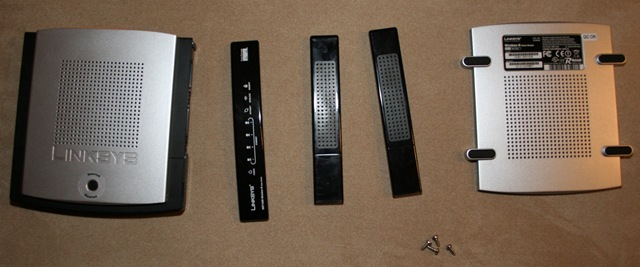
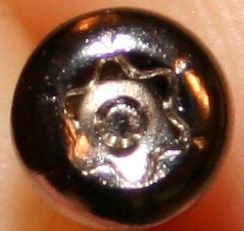
    • Disassemble the box. There is 4 tox screws on the button under the redeemable plastic cover.
    • IMG_7317 IMG_7326
      IMG_7327 IMG_7325
      IMG_7329 IMG_7318
      IMG_7319 IMG_7323
  • Step 3
    • Try short wiring two of the pins on the flash chip. Ping 16 & 17. http://voidmain.is-a-geek.net/redhat/wrt54g_revival.html
    • Short circuit ping 16 & 17 – Chip VER: 1.00.5 CS:F898 – the one with the two red dots on. Power the device up when short circuiting and se if the ping gets a response.
      IMG_7322
  • Step 4 Recovery by JTAG cable http://www.dd-wrt.com/wiki/index.php/Recover_from_a_Bad_Flash
    • Step 3 did not work. We the has to create a JTAG. To program the circuit directly from the computer. ๐Ÿ™
    • Construction a JTAG: There is a simple and easy way to construct such a device. You need:
      • A parallels connector
      • 4 x 100 Ohm resistors
      • Some wire not to long (15 cm)
      • A Connector socket for the circuit board & connector for the wire ass well.
    • Assemble the parts as shown below
      JTAG 
      IMG_7330 IMG_7331
      IMG_7332
    • Now the wire is ready now the circuit board has to be prepped as well. There is two connectors for the JTAG on the board. JP1 & JP3. Here it is the JP1 you have to use.
       IMG_7324
    • Download the tjtagv2.zip (769,27 kb). Connect the cable to the pc then the WRT150N JP1 and power up the WRT150N.
    • Set up the tjagv2 as described in the zip. Then start a command prompt and fire the commands:
      • tjagv2 /probeonly /noemw
        • Now you should get something like:

    =================================================
    WRT54G/GS EJTAG Debrick Utility v4.8-Tornado-MOD
    =================================================
    Probing bus … Done
    Instruction Length set to 8
    CPU Chip ID: 00010101001101010100000101111111 (1535417F)
    *** Found a Broadcom BCM5354 KFBG Rev 1 CPU chip ***

    – EJTAG IMPCODE ……. : 00000000100000010000100100000100 (00810904)
    – EJTAG Version ……. : 1 or 2.0
    – EJTAG DMA Support … : Yes

    Issuing Processor / Peripheral Reset … Done
    Enabling Memory Writes … Skipped
    Halting Processor … <Processor Entered Debug Mode!> … Done
    Clearing Watchdog … Done

    Probing Flash at (Flash Window: 0x1fc00000) … Done

    Flash Vendor ID: 00000000000000000000000010001001 (00000089)
    Flash Device ID: 00000000000000001000100011000011 (000088C3)
    *** Found a Intel 28F160C3 1Mx16 BotB (2MB) Flash Chip ***

    – Flash Chip Window Start …. : 1fc00000
    – Flash Chip Window Length … : 00200000
    – Selected Area Start …….. : 00000000
    – Selected Area Length ……. : 00000000

    *** REQUESTED OPERATION IS COMPLETE ***

    •  
      • tjagv2 -rease:nvram
        • it will show all the addresses it erases. Now the device should start responding to the pings, which was the case for me. ๐Ÿ™‚ If you have accidentally delete the whole flash you need to put back a bootloader cfe.bin. I made a backup of mine here: CFE.BIN (256,00 kb) for WRT150N.

References:

Install DD-WRT on Linksys WRT150N – be careful

I have a Linksys WRT150N and want to try installing dd-wrt on the router to solve a problem with one of my computers which keeps disconnection from the router when a large file transferee is started.

Install instructions for WRT150N on the dd-wrt site.

I want to upgrade. I stated by uploading the dd-wrt firmware through the web interface, but it didn’t work. After reset the router didn’t response at all.

The mini build bricked my router. Read this blog post to see how to unbrick the router. http://blog.lausdahl.com/post/Debrick-Linksys-WRT150N.aspx

After the router has been unbricked I was really happy I thought it was a useless box but it came back.

Installing the standard version of dd-wrt.v23_sp2_standard.zip caused the dd-wrt firmware to recognize my router as a WRT300N. Then the wireless didn’t work. To solve this problem I looked at the RC version WRT150N_v1 then the router upgrade was complete. It works perfect ๐Ÿ™‚


wrt150n

How to enable the DVD Library in Windows Vista Media Center

Warning: Remember all registry changes are made at your own risk.

  1. Exit Windows Media Center if it is running.
  2. Click StartStart button, type regedit in the Start Search box, and then click regedit in the Programs list.
  3. Locate and then click the following registry subkey:

    HKEY_CURRENT_USER\Software\Microsoft\Windows\CurrentVersion\Media Center\Settings\DvdSettings

  4. In the results pane, right-click ShowGallery, and then click Modify.
  5. Delete the contents that appear in the Value data box, type Gallery in the Value data box, and then click OK.
  6. Exit Registry Editor

Now all of your DVD titles should appear in the new Vista DVD Gallery, providing easy access.

Aladdin eToken Pro Driver & Management Software

Password: 3g040U42

Link: ftp://ftp.ealaddin.com/pub/etoken/PKI%20Client/PKI_Client_4_0.zip

Rational Rose on Windows Vista With the FLEXlm running as a console app

The FLEXlm service does not work on windows vista:

  image

But there is a workaround. Follow the steps below:

I had selected compatibility mode "windows xp sp2" for all the apps used below and used administrator rights for all the apps and the console as well.

  • Download the files listed for your windows version xp. link
  • Unzip them in a folder "c:\flexlm\"
  • Place your license file in this folder with the name "license.dat"
  • Run "i86_n3_lmgrd -c license.upd -l log -z"
    • z is only used to show you what the app does. incoming / outgoing connections
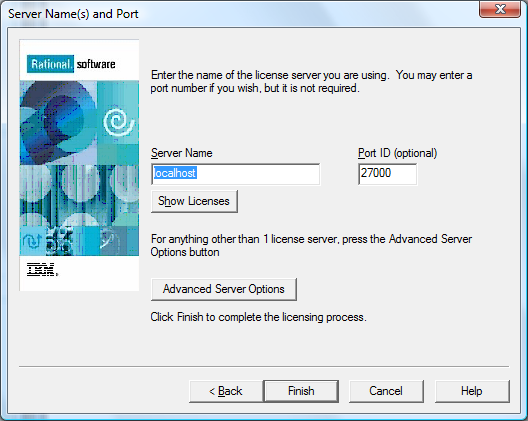
  • Now you computer is running with the license server located on: "localhost:27000"
  • Use Rational License Key Administrator
    • Then select the "Point to a Rational License Server…"
    • image
    • Add the license file as well
    • image  
    • Then the list will look like
    • image
  • Now you can connect to this license server and run Rational Rose as normal.
  • image

Mappings between C# and UML elements

Se link
 

C#_UML_mapping.pdf (27,50 kb)

Top