

To enable the Japanese characters (Shift-JIS) the operation system needs to install the fonts.
This is how to do it in Windows Xp:
- Install the fonts. This is done in the Regional Options under languages
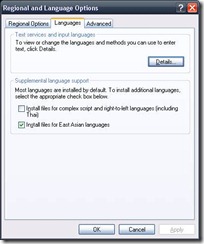
- Select the Install files for East Asian languages. The windows cd is needed.
- After this a restart is needed.
- In Eclipse select properties of the file which contains Japanese characters and select Test file encoding.
- Chose: UTF-8 and click ok.

- Now you can open the file with any editor in Eclipse and it should show the file correctly.


Here is a link to a site which describes how to do the same for other operation systems.
Leave a Reply